Throughout my experience, I’ve frequently observed developers and content authors unintentionally using the Publish Site option. To prevent these errors, in some projects, we even removed the Publish Site option from the Core database.
Several of my colleagues asked me how I handle such situations, and my response was straightforward: recycle the app pool! 😄 (Please don’t try this at home!)
This approach only works on your local machine; you can’t take the site down in higher environments, so we need an alternative solution. Additionally, disabling or removing the Publish Site option from the Core database isn’t an ideal solution, in my opinion, because there are scenarios where a full site publish is necessary, albeit rarely.
Now, I’ll share my approach for such scenarios (not ideal but harmless). I keep a Sitecore package ready, which consists of a small media item that isn’t used anywhere but is present in the Media Library. You can add a similar asset to your Sitecore instance. My asset is about 10 KB in size. When creating the Sitecore package using SPE, I select the “Override” option for package installation.
Whenever you start Publish Site accidently, refresh the screen and go ahead and install this Sitecore package, once the package is successfully installed, you get 2 options: Restart the Sitecore Client & Restart the Sitecore Server.
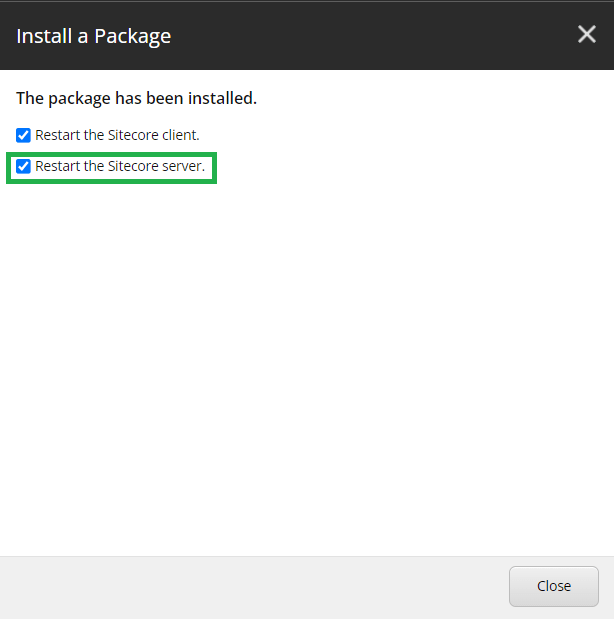
Check the “Restart the Sitecore Server” and click Close. This stops all the scheduled tasks running in the background and the Sitecore is back to normal within few seconds.
We can use this solution whenever a longer content chunks are being published and the job gets stuck and all the following publish commands are going in the queue.
Hope this helps.
Thank you.. Keep Learning.. Keep Sitecoring.. 🙂
 Sitecore Diaries