In the previous blog, we saw how to add the user to the Subscription list using Sitecore Marketing Automation, now lets see how to manage it. Management of the list means if the user plans to unsubscribe for any reason then the user should be removed from the subscription list.
It will be similar to the Subscription MA but bit different as we will be removing the contact from Subscription List and add it to the Global List.
- Initiate the procedure by incorporating a Trigger Goal submit action into the Sitecore Form designated for Unsubscribing from the Newsletter. Label this goal as “Unsubscribe.”

- Whenever user submits the Unsubscribe Form, the goal “Unsubscribe” will be triggered.
- Create a blank List (Unsubscribe List) under List Manager (Please refer previous blog to see how it is done).
- Now it is time to create MA.
- Create a blank MA from Marketing Automation tool under Launchpad (Please refer previous blog to see how it is done).
- There are 2 actions by default -> Start and End.
- The Start needs an action -> Goal, Outcome, etc.
- Select “Unsubscribe” goal in the Start action.
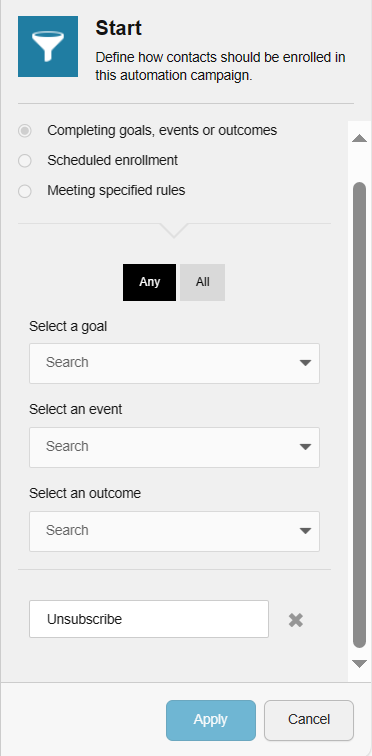
- Add an action between Start and End, Add Contact to a list.
- Select the Unsubscribe List inside the Add Contact to a list action.
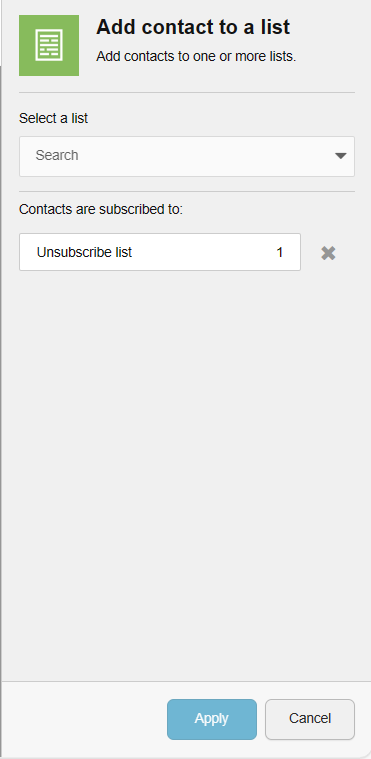
- Add an action between Add Contact to a list and End, Unsubscribe from a list.
- Select the Subscription List inside the Unsubscribe from a list action.
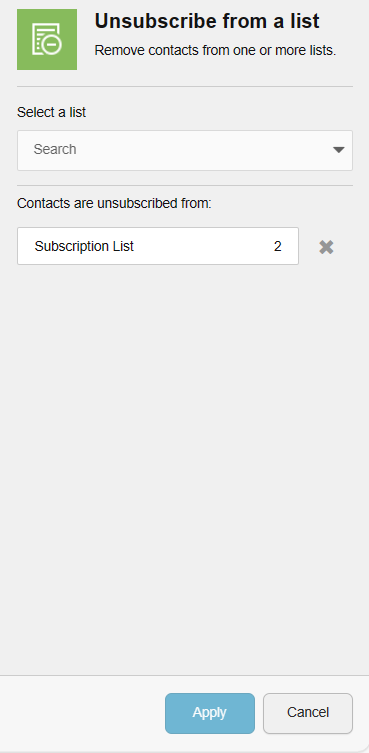
- We are almost done.
- Click on Save and you will receive a pop-up where you will need to specify the name of MA, Start Date, End date, Enrolling the user # of times.
- Save it, click on the drop icon and Activate the MA.

Once activated, every user submission of the Unsubscribe form will result in their exclusion from the subscription list under List Manager. Subsequently, you can export the latest list from List Manager for email campaign distribution.
 Sitecore Diaries